From Prompting to Directing
Most AI video workflows still feel like writing a wish and waiting to see what happens. You describe the shot, the model interprets it, and then you iterate until the output gets close enough.
That works for quick experiments. But for drama, commercials, music videos, and serialized stories, creators need more than luck. They need control over who stands where, how characters move, what the camera sees, and how a video model should follow the scene.
That is the idea behind Director Studio in Plot Party: a visual directing layer that helps you stage a scene before sending it to AI video models like Seedance. Instead of relying only on text prompts, you can build a clearer visual guide for the model — closer to how a director plans a shot.
What Is Director Studio?
Director Studio is a control workspace for AI video creation. It helps you turn an uploaded image or creative idea into a more structured scene: characters, positions, props, environment, poses, and camera angles.
Think of it as a lightweight virtual set. You are not just telling the AI what to make — you are showing it the blocking, the composition, and the camera language you want.
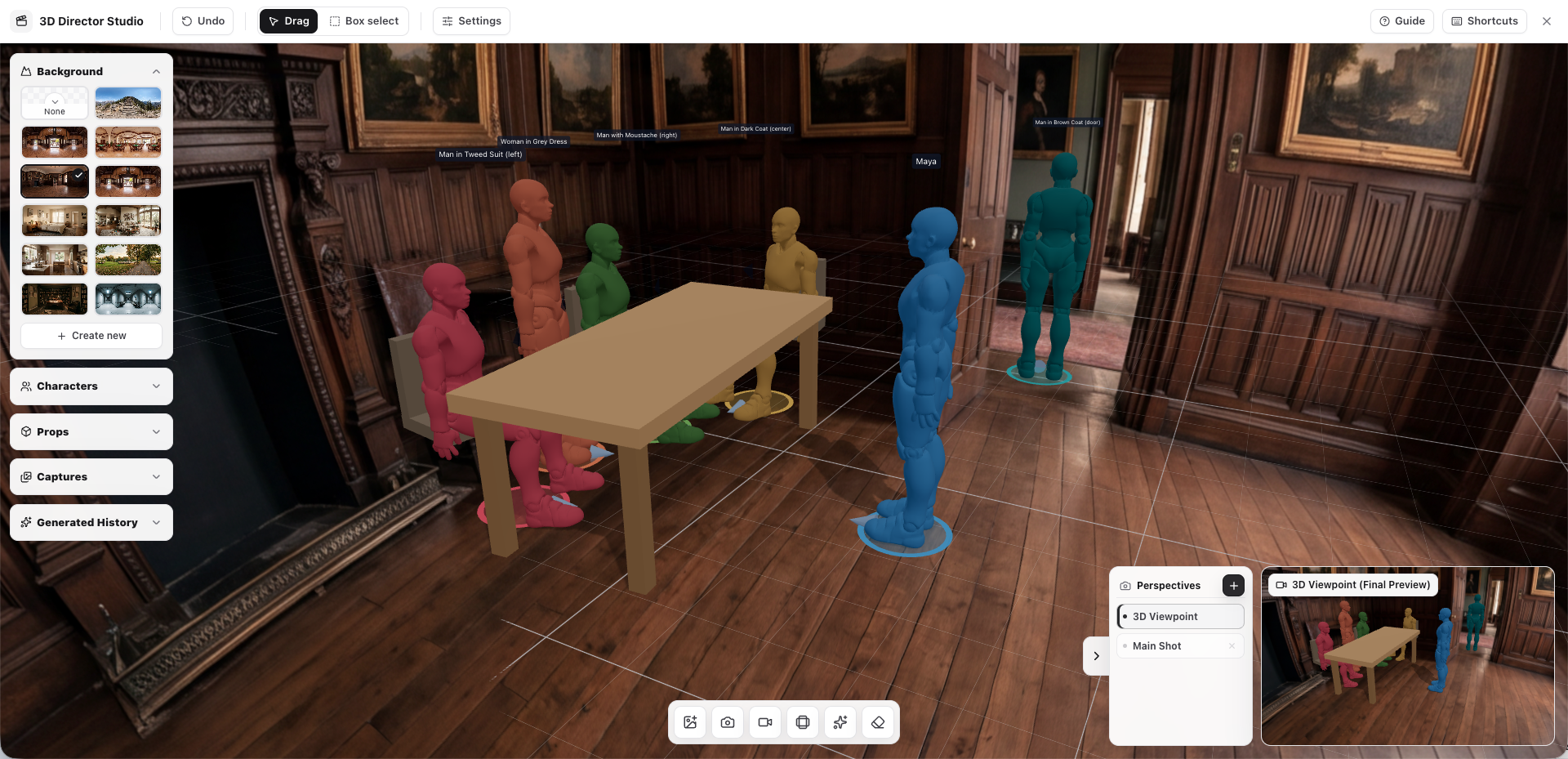
For creators, this matters because video generation is highly sensitive to visual intent. A small difference in character placement or camera direction can change the entire feeling of a scene. Director Studio gives you a more practical way to guide that intent before generation begins.
Why Text Prompts Alone Are Not Enough
Text is powerful, but it has limits. If you write:
"A woman turns toward the camera in a dramatic bedroom scene, cinematic lighting, slow push-in."
The model still has to guess:
- Where is the character standing?
- Is she facing left, right, or directly forward?
- Is the camera above eye level or below it?
- What does the room layout look like?
- Should the movement feel intimate, tense, romantic, or suspenseful?
For one-off clips, these guesses may be acceptable. For story-driven production, they create friction. You may burn multiple generations trying to fix composition issues that could have been solved earlier with better visual guidance.
Director Studio reduces that gap. It gives the model a clearer starting point, so creators can spend less time correcting misunderstandings and more time refining the scene.
1. Build a Scene From an Uploaded Image
Director Studio can use an uploaded image as the foundation for a controllable scene. From there, creators can organize the elements that matter most for a shot:
- Character layout — where each person appears in the frame
- Scene structure — the spatial relationship between background, foreground, and action
- Props and objects — visual details that support the story
- Composition — how the shot should read before the model starts generating motion
This is especially useful when you already have concept art, a storyboard frame, a character image, or a reference still. Instead of asking the model to infer everything from a paragraph, you can begin from a concrete visual layout.
For microdrama creators, this is a major workflow upgrade. You can keep scenes consistent across episodes, preserve the emotional logic of a shot, and make sure the model understands the world you are building.
2. Control Character Actions and Poses
Characters are the heart of any drama scene. Their body language often communicates more than dialogue: hesitation, confidence, fear, attraction, betrayal.
Director Studio lets creators adjust character actions and poses more freely before generation. Instead of repeatedly rewriting prompts like "make the character lean forward slightly" or "have him stand with one arm raised," you can visually direct the pose you want.
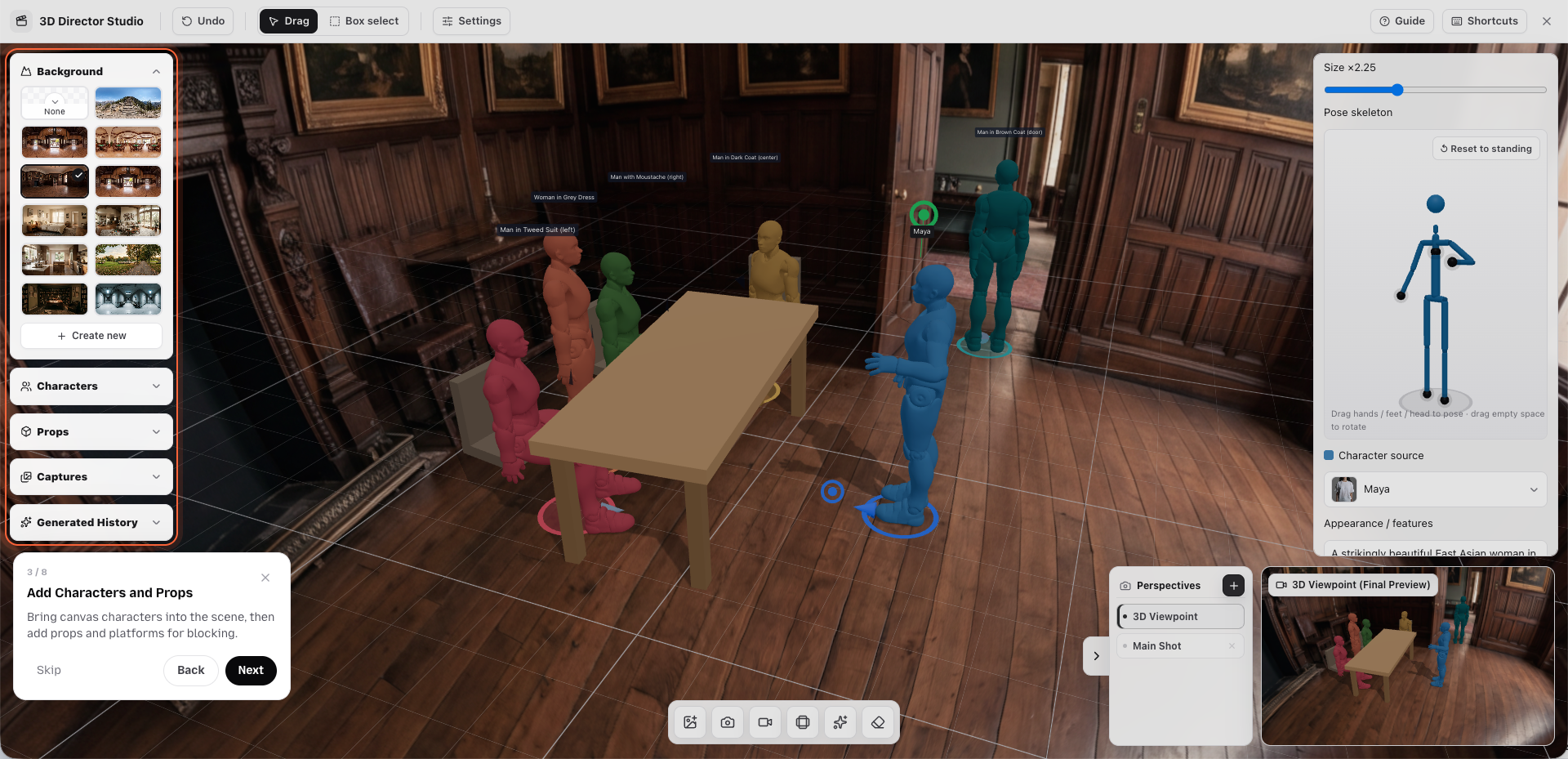
This helps with:
- Performance clarity — show the model what the character should physically do
- Emotional tone — direct posture, tension, distance, and orientation
- Continuity — keep character behavior consistent from shot to shot
- Action readability — make key movements easier for the model to understand
For AI filmmaking, pose control is not just a technical feature. It is a storytelling feature. A character standing two feet farther away, turning their shoulders, or looking toward the wrong side of the frame can change the scene's meaning. Director Studio gives creators a way to catch and guide those choices earlier.
3. Record Camera Direction as a Video Model Prompt
Camera movement is one of the hardest things to describe with text. Terms like push-in, dolly, orbit, pan, and tracking shot are useful, but they still leave room for interpretation.
Director Studio lets creators freely adjust camera direction and record camera movement as a visual guide. That recorded movement can then be used to prompt video models such as Seedance.
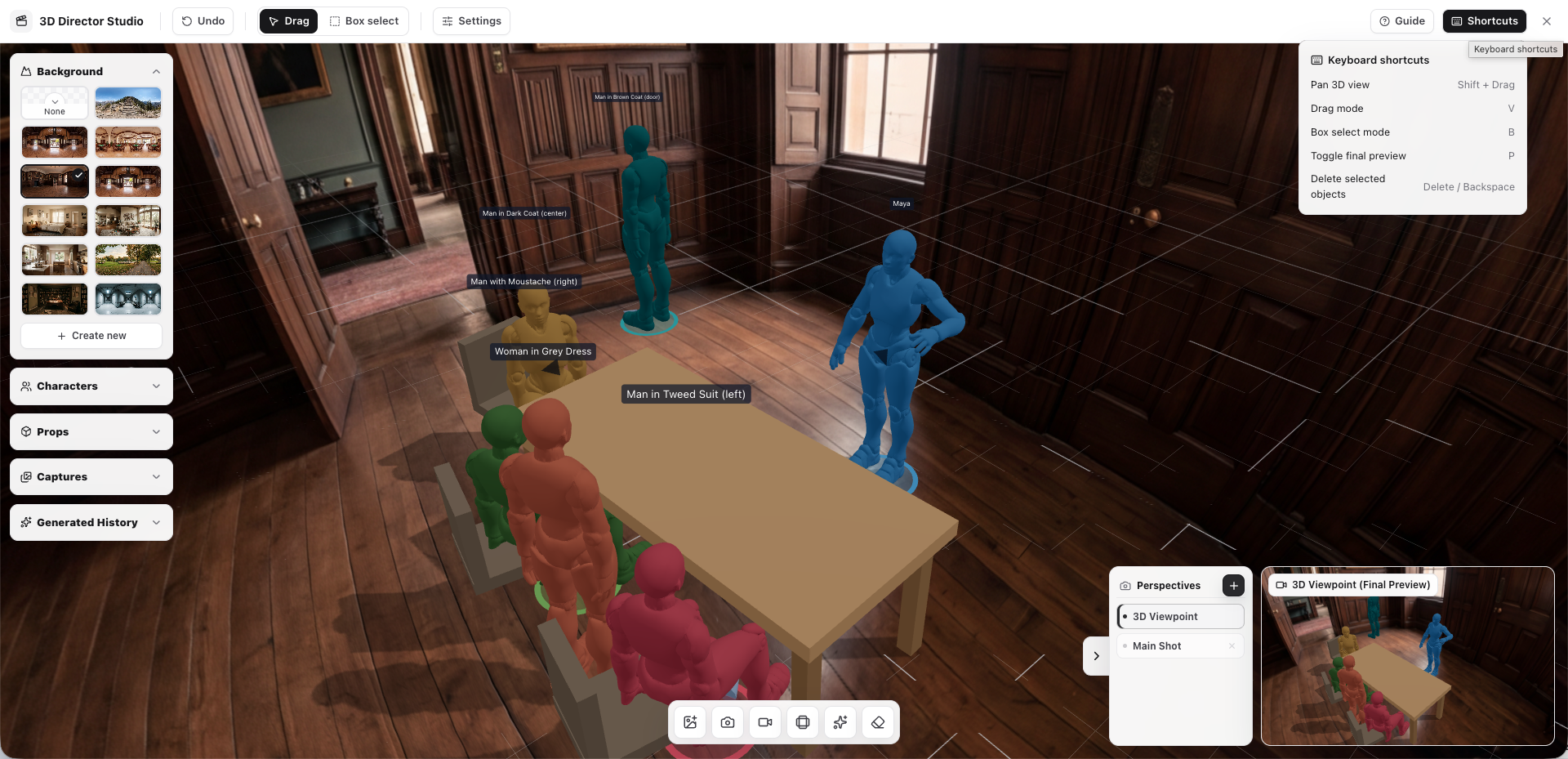
This creates a more intuitive bridge between your creative intent and the model's output. Instead of only saying "make the camera move around the character," you can show the camera path you want the model to follow.
That is valuable for scenes like:
- A slow push-in before a confession
- A rotating camera move around a hero character
- A handheld-feeling move through a crowded room
- A reveal shot that starts behind one character and ends on another
- A product-style move where the camera frames an object from multiple angles
For models with strong reference understanding, like Seedance, this kind of camera guidance can make generations feel more deliberate and less random.
How Director Studio Makes AI Video More Controllable
Director Studio improves the AI video workflow in three practical ways.
Video models perform better when the input is clear. A structured scene, controlled character pose, and guided camera movement give the model more information than text alone.
Fewer Wasteful Regenerations
When composition and blocking are wrong, creators often need to regenerate the entire clip. By resolving more of those decisions before video generation, Director Studio can reduce trial-and-error.
More Creative Confidence
Creators do not want to feel like they are negotiating with a black box. They want to direct. Director Studio gives them more visible control over the scene before committing credits and time to generation.
A Practical Workflow for Creators
Here is a simple way to use Director Studio inside a Plot Party production workflow:
- Start with a story beat — define what the scene needs to communicate emotionally.
- Upload a reference image — use concept art, a storyboard frame, or a generated scene image.
- Arrange the scene — guide character positions, props, and spatial relationships.
- Set character poses — make sure the body language matches the moment.
- Plan the camera — choose the angle and record movement if needed.
- Send the guided shot to a video model — use the visual setup as a stronger prompt for generation.
- Review and iterate — adjust the scene or camera direction before spending more generations.
This makes the process feel closer to previsualization in traditional filmmaking: plan first, generate second, refine third.
Who Benefits Most?
Director Studio is especially useful for creators who need consistency and direction across multiple shots:
- Microdrama creators who need clear character staging across episodes
- AI filmmakers who care about camera language and visual continuity
- Commercial creators who need product, actor, and camera placement to feel intentional
- IP holders who want characters and worlds to stay recognizable
- Social video teams who need faster iteration without losing creative control
The common need is the same: creators want AI to move faster, but they also want the result to feel directed.
The Bigger Shift: AI as a Production Partner
The future of AI video is not only about better models. It is also about better creative control.
As models become more capable, the bottleneck shifts from "Can the AI generate video?" to "Can I reliably get the video I imagined?" Director Studio is designed for that second problem.
It helps creators move from prompt guessing to visual directing:
- Stage the scene
- Shape the performance
- Guide the camera
- Generate with clearer intent
That is how AI video becomes less like a slot machine and more like a creative production tool.
Ready to Direct Your Next Scene?
Director Studio gives creators a more hands-on way to control AI video generation — from character layout and poses to camera direction and model guidance.
If you are building microdramas, story worlds, or cinematic short-form content, this is where AI creation starts to feel less like prompting and more like directing.
Start creating with Plot Party →
For more on using advanced video models, read our Seedance 2.0 guide. If you are new to Plot Party, start with the step-by-step drama episode tutorial.
FAQ
What is Director Studio in Plot Party?
Director Studio is a visual control workspace for AI video creation. It helps creators stage characters, props, poses, composition, and camera movement before sending a scene to an AI video model.
Why is visual control important for AI video generation?
Visual control matters because AI video models can interpret the same text prompt in many different ways. Blocking, pose, and camera guidance reduce ambiguity, which can lead to more consistent shots and fewer wasted regenerations.
Who should use Director Studio?
Director Studio is useful for microdrama creators, AI filmmakers, commercial creators, IP holders, and social video teams that need more control over character placement, continuity, and camera language.