
Resident Evil: Your Pet is Heading to Raccoon City!
Upload a photo of your pet to generate a viral AI video inspired by the Resident Evil courier scene in which the protagonist races to Raccoon City. Powered by Seedance 2.5.

Prompt
How It Works in 3 Steps
- Step 01
Upload a Photo of Your Pet (@Reference1)
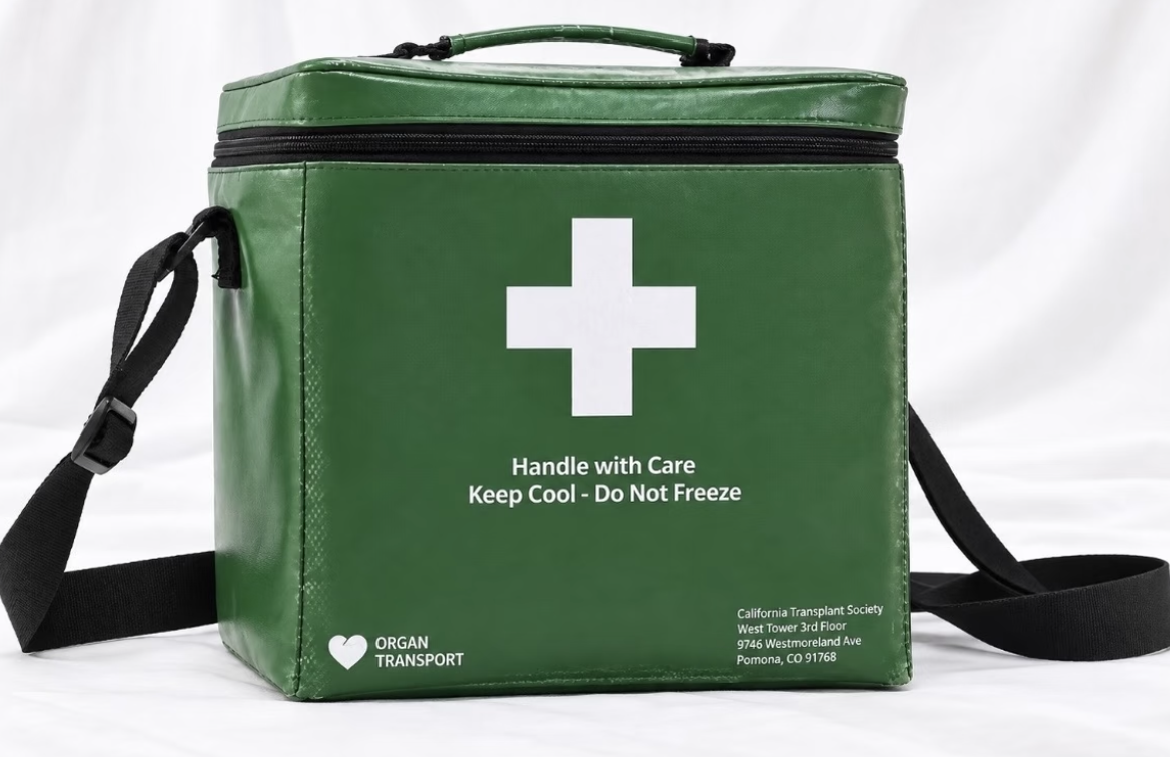
Upload one photo of your pet in the dashed upload area on the right. The template preloads a green medical transport box (@Reference2) and a blue work vest (@Reference3); both references can be replaced by the user.
- Step 02
Automatically Adapt the Prompt for Cat, Dog, or Parrot
The system automatically detects whether the uploaded pet is a cat, dog, or parrot, with no manual selector. It then dynamically updates the character name and the four-limb or two-wing / two-leg action constraints in the underlying prompt to reduce anatomy distortions.
- Step 03
Generate with Seedance 2.5
Seedance 2.5 powers the multi-reference video remake. The generation uses the pet appearance, the selected green medical transport box, the selected blue work vest, and the original running-scene action while preserving the source clip’s camera angles, smoky-street lighting, action timing, and original audio / BGM. Generate a pet-courier video of your own pet running toward Raccoon City.
Pet-to-Raccoon-City Template vs. Generic AI Video Generation
| Feature | Generic AI Video Generation | Plot Party Pet-to-Raccoon-City Template (Seedance 2.5) |
|---|---|---|
| Required Inputs | Find the original clip, isolate the medical box, and write complex prompts. | Upload one pet photo. The green medical transport box and blue work vest are preloaded by default and can each be replaced by the user; the source clip is handled internally. |
| Species Adaptation | Often locked to one animal; switching to a dog or parrot can cause extra or malformed limbs. | Automatically adapts the prompt for Cat / Dog / Parrot and applies the matching anatomy constraints. |
| Prop Fidelity | The green medical box and blue vest may deform or disappear during the run. | Uses the green medical transport box (@Reference2) and blue work vest (@Reference3) as separate, replaceable references. Users can customize either prop while the model uses the selected references to maintain visual consistency throughout the video. |
| Camera & BGM | May lose the source camera language and omit the original audio / music. | Preserves the Resident Evil running-scene pacing and original audio / BGM. |
Frequently Asked Questions
What do I need to create the Resident Evil pet carrying-box running AI video?
You only need one photo of your pet. Upload it to the “Upload a photo of your pet” area. The green medical transport box (@Reference2) and blue work vest (@Reference3) are preloaded by default, and you can replace either one.
Can I use a photo of my dog or parrot?
Yes. Whether you upload a cat, dog, or parrot, the template automatically replaces the main character in the underlying prompt with the matching species (cat, dog, or parrot) and applies the corresponding anatomy constraints, so your pet can hold the green box while running on two legs.
Where does the “Your Pet is Heading to Raccoon City” meme come from?
This remix template is inspired by the 2026 film Resident Evil. The scene of the medical courier Bryan running toward a Raccoon City hospital while carrying an emergency medical box inspired a wave of pet character-replacement remixes online.
Which AI video model powers this template?
The template is powered by Seedance 2.5. It uses multi-reference image and video-remake capabilities, combining the pet appearance from @Reference1, the user-selected green medical transport box from @Reference2, the user-selected blue work vest from @Reference3, and the original running-scene action / camera movement.
Can I upscale the generated pet running video to 4K?
Yes. After generating a clip you like, use Plot Party’s built-in SeedVR 2 4K Video Upscaler to enhance the video to 4K Ultra HD resolution.